
Put the right work on the right truck, and keep the day on track when it changes.
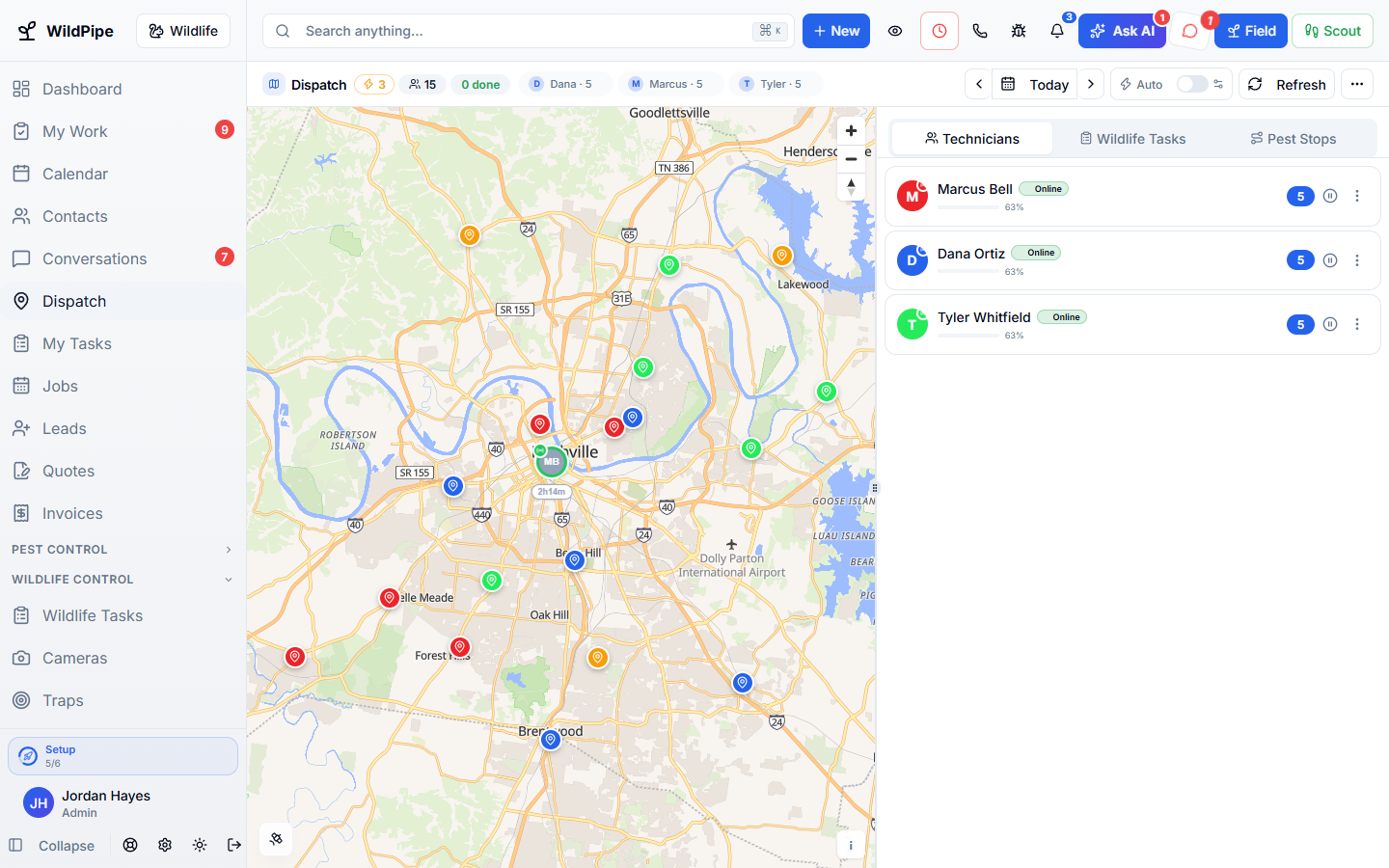
Booked calls, online bookings, recurring visits, and trap pickups land in one live plan. Assign them yourself or let WildPipe do it by your rules, build a sensible driving order, and keep customers and technicians updated without extra phone calls.
Part of one system
Work arrives already filled in, and leaves ready for the next step.
Dispatch & Routing is not a separate app you connect. It works from the same customer, job, and record your office, phones, field team, and billing already use.
Comes in from
Calls & AI agents
A call booked by your team or the AI assistant arrives as a waiting stop with the address, arrival window, and notes already filled in.
Comes in from
Online booking
Customers can only pick real openings, and their booking lands in dispatch ready to assign.
Comes in from
Recurring plans
Upcoming plan visits come into dispatch ahead of their due date, with the usual technician when you want one.
Comes in from
Cameras & traps
When your team confirms a captured animal on camera, the pickup goes straight into dispatch.
What happens here
Dispatch & Routing
- Dispatch Board
- Route Planning
- Scheduling & Calendar
- Live Technician Tracking
- Vehicles & Maintenance
Same customer, same job, same record.
Goes out to
Field app
Technicians see their route, stop order, instructions, and changes on their phone, even with a weak signal.
Goes out to
Customer updates
On-the-way texts and a tracking link show your logo and colors, without exposing anyone else’s stops.
Goes out to
Invoicing
Completed stops carry their notes, photos, and charges into billing, so nothing is re-typed.
What it replaces
One system instead of a stack of tools.
- A whiteboard or spreadsheet of who goes where
- A separate route-planning app
- A truck tracking app with its own logins
- Texting customers “on my way” by hand
- Calling technicians every time the plan changes
What changes for you
Less chasing. More finished work.
Urgent work goes first
Your priority order decides what gets a slot when the day is full, so a trapped animal does not wait behind a routine bait refill.
Fewer wasted drives
Stops at the same property stay together, and new work slots into the route instead of reshuffling everyone’s day.
Fewer “where is he?” calls
Customers get on-the-way updates and a branded tracking link tied to their own visit.
One update, not twenty
When stops are added to a route, the technician gets one combined notice instead of a stream of alerts.
Inside Dispatch & Routing
Explore each part.
Dispatch Board
Know who is going where.
- One map, one work list
- Manual assignment & route control
- Automatic dispatch & priorities
Route Planning
Spend less of the day figuring out the route.
- Stop order & driving plan
- Appointments & work constraints
- Pins, changes & live estimates
Scheduling & Calendar
Make a plan your team can follow.
- Appointments & arrival windows
- Availability & repeat visits
- Changes & crew coordination
Live Technician Tracking
Answer “Where is my technician?” with a link.
- Live route progress
- Customer tracking links
- Location choices & staff control
Vehicles & Maintenance
Keep your trucks ready for work.
- Vehicle records & assignments
- Maintenance history & costs
- Mileage & purpose
Clear answers. No sales jargon.
Good to know.
Choosing software is a business decision. Let’s make sure it fits the way you work.
Talk through your questionsDo I have to use automatic dispatch?
No. Many companies start by assigning work themselves on the board and turn on automatic dispatch later.
Does this work for both pest and wildlife work?
Yes. Recurring pest routes, trap checks, and wildlife appointments share the same board and routes.
Do my technicians need a separate app?
No. Their route, stops, and changes appear in the WildPipe field app they already use for the job.
Your business. Your next chapter.
See what a better
working day looks like.
Bring your questions. We’ll show you how WildPipe fits the way your business works.