
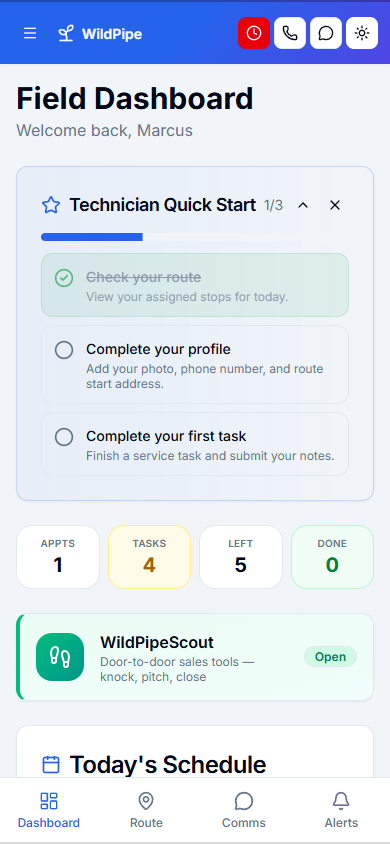
Give technicians the whole job in their pocket, even where the signal drops.
Technicians see their route, instructions, customer history, and checklists on their phone, record photos and notes, take payment, and finish the visit. Work done without a signal is saved and sent when the signal comes back.
Part of one system
Work arrives already filled in, and leaves ready for the next step.
Field Work is not a separate app you connect. It works from the same customer, job, and record your office, phones, field team, and billing already use.
Comes in from
Dispatch & routes
The day’s route and every change arrive on the technician’s phone.
Comes in from
Customer records
Each stop carries the customer’s history, property access, and safety notes.
What happens here
Field Work
- Field App
- Offline Field Mode
- Stock & Equipment
- Door-to-Door Sales
Same customer, same job, same record.
What it replaces
One system instead of a stack of tools.
- Printed route sheets and job tickets
- A separate photo app
- Paper inspection and service forms
- Texting the office for gate codes and history
- A clipboard of door-knocking notes
What changes for you
Less chasing. More finished work.
Fewer calls to the office
Gate codes, pets, history, and instructions are on the visit.
Complete reports
Required photos, notes, and signatures are asked for before a visit can be finished.
Work keeps going offline
Field screens open from a saved copy, and finished work is sent when the signal returns.
Trucks stocked for the day
The route shows which traps and supplies the day needs, and what is already on the truck.
Inside Field Work
Explore each part.
Field App
Give your crew the details in their pocket.
- Route, visit & customer context
- Photos, reports & completion
- Quotes, payments & team tools
Offline Field Mode
Keep working when the signal drops.
- Works with no signal
- Saved safely, sent on its own
- Know what has and hasn’t sent
Stock & Equipment
Know what you have before you send the crew.
- Stock, locations & transfers
- Truck loads & equipment lifecycle
- Products, variants & catalogs
Door-to-Door Sales
Know which doors may turn into work.
- Territories & door records
- Leads, estimates & next steps
- Team activity & results
Clear answers. No sales jargon.
Good to know.
Choosing software is a business decision. Let’s make sure it fits the way you work.
Talk through your questionsDoes it work on iPhone and Android?
Yes. Technicians use the WildPipe field app on their phone.
What happens when there is no signal?
Field screens open from a saved copy, and finished work waits on the phone until it can be sent. Nothing is thrown away.
Your business. Your next chapter.
See what a better
working day looks like.
Bring your questions. We’ll show you how WildPipe fits the way your business works.