
Every text, email, chat, and note in one conversation per customer.
Texts, calls, emails, website chats, forms, and notes are grouped by customer and company in one inbox. Customers handle simple things themselves on their account page, and your team gets alerts and chat in the same system.
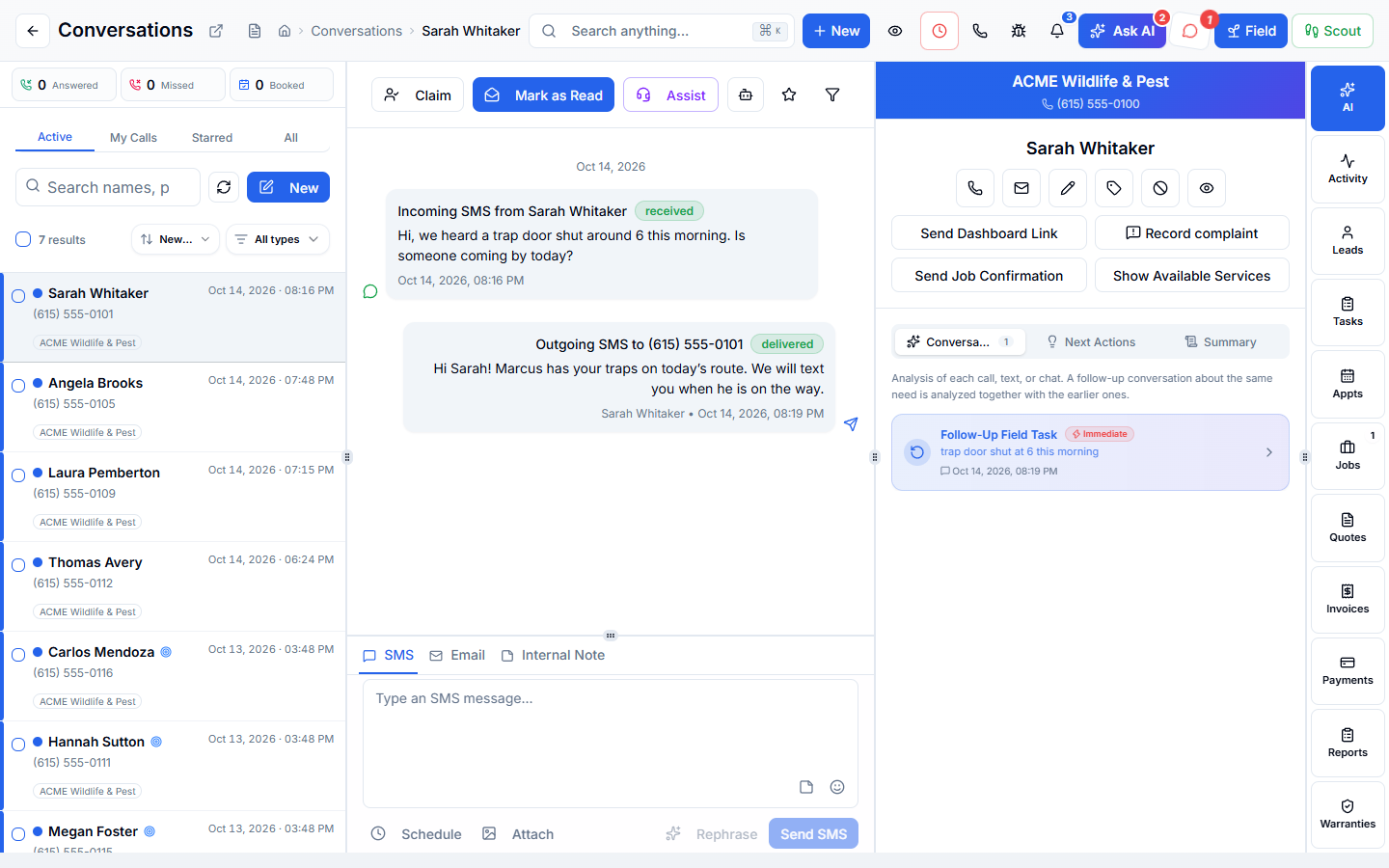
Part of one system
Work arrives already filled in, and leaves ready for the next step.
Customer Messaging is not a separate app you connect. It works from the same customer, job, and record your office, phones, field team, and billing already use.
Comes in from
Phones & AI
Calls, voicemails, and AI assistant requests land in the same conversation.
Comes in from
Website
Forms, chats, and bookings from your website arrive as conversations.
What happens here
Customer Messaging
- Customer Messages
- Business Email
- Customer Account Page
- Alerts & Reminders
- Team Chat
Same customer, same job, same record.
What it replaces
One system instead of a stack of tools.
- A separate texting app
- A shared email inbox
- Website chat software
- A team messaging app
- Calling customers back just to resend a document
What changes for you
Less chasing. More finished work.
One place to reply
Answer by text, email, or chat from the same conversation.
Nothing slips
Unread conversations stay unread until someone handles them.
Fewer “can you resend that” calls
Customers open their invoices, documents, and visits on their own account page.
Your team in sync
Team chat and alerts keep the office and the field talking.
Inside Customer Messaging
Explore each part.
Customer Messages
Stop checking a pile of inboxes.
- One customer thread across channels
- Live work & follow-up signals
- Replies & customer actions
Business Email
Keep business email with the work.
- Company & personal addresses
- Customer threads & inbox review
- Safe reading & forwarding
Customer Account Page
Let customers handle the simple things.
- Visits, history & documents
- Quotes, invoices & payment methods
- Plans, warranties & your brand
Alerts & Reminders
Find out what needs you.
- Work alerts & linked records
- Sound & channel preferences
- Useful route updates
Team Chat
Keep your team in touch.
- Direct messages & team rooms
- Office & field access
- Unread messages & coordination
Clear answers. No sales jargon.
Good to know.
Choosing software is a business decision. Let’s make sure it fits the way you work.
Talk through your questionsDo texts come from my business number?
Yes. Texts are sent from your company’s own numbers.
Can I keep each brand separate?
Yes. Conversations are grouped by customer and by company, so your brands stay separate.
Your business. Your next chapter.
See what a better
working day looks like.
Bring your questions. We’ll show you how WildPipe fits the way your business works.