
Ready for an inspection
Search and export the records an inspector asks for.
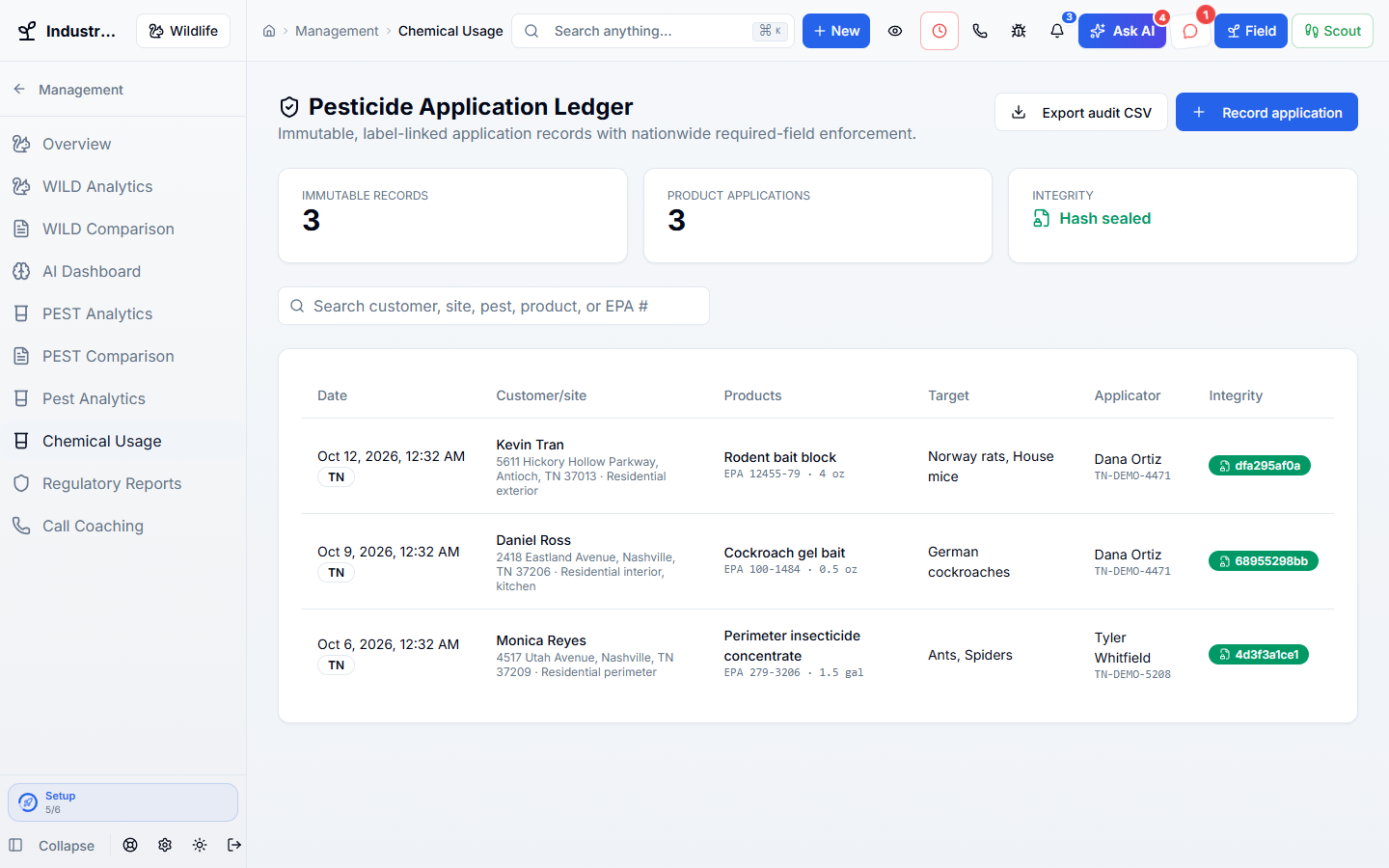
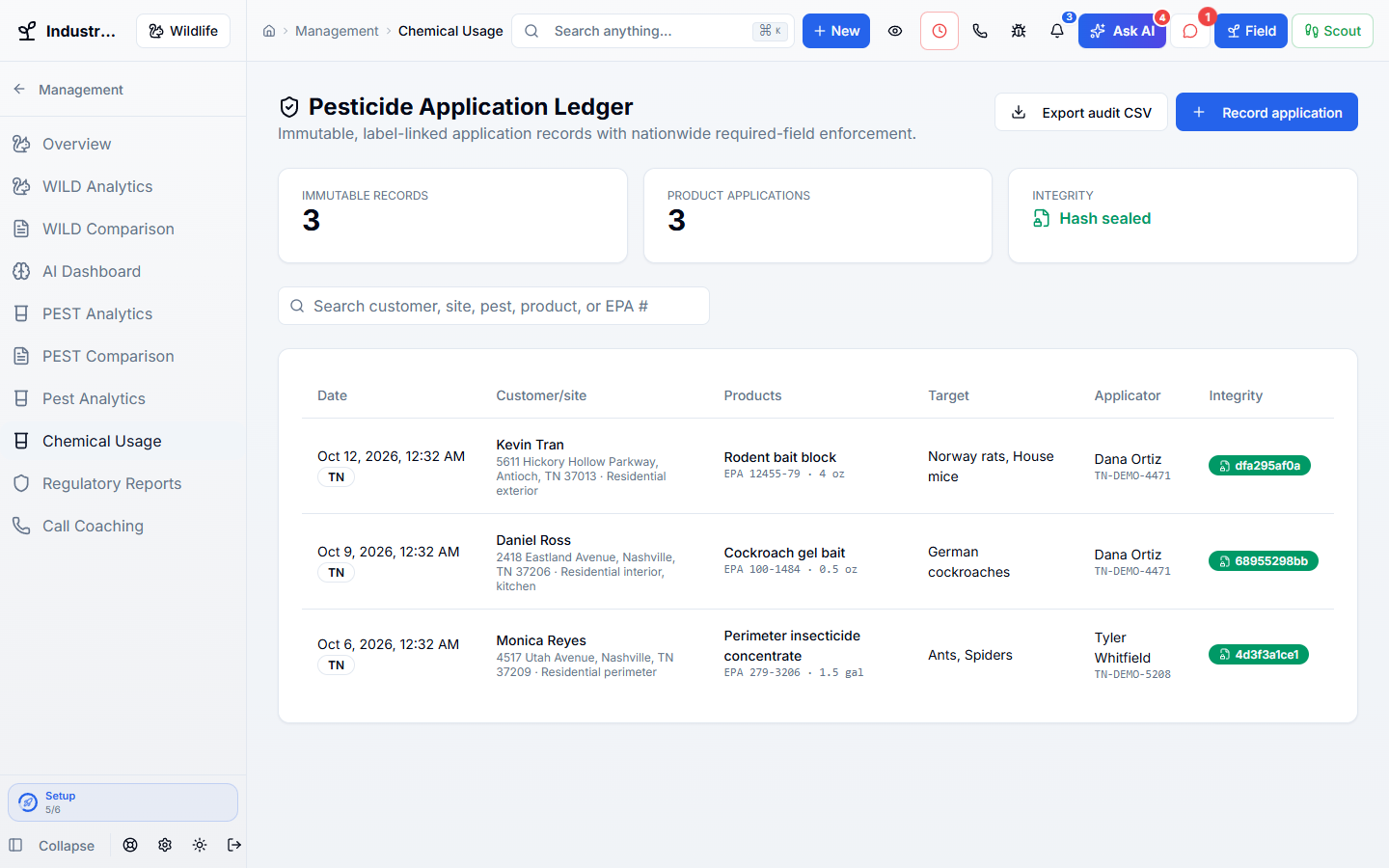
Record each pesticide application with the product, EPA number, amount, weather, and licensed applicator. Saved records cannot be quietly changed, and you can export them when an inspector asks.
Works hand in hand with the rest of WildPipe
Built for your everyday work
Record every product and EPA number
Sound familiar?
When the state inspector asks for last year’s applications, a pile of paper tickets and a few typed notes is not an answer.
What Pesticide & Compliance Records does for you
Every pesticide you put down, with the product, EPA number, amount, weather, and licensed applicator, saved so it cannot be quietly changed when the state inspector shows up.
Search and export the records an inspector asks for.
Corrections are added as amendments, and the original stays.
Each record names who applied it and their license.
Records are filled in on the visit, not at the end of the week.
Why owners switch
The things owners complain about most in other software, and how WildPipe handles them instead.
With other software
Application records can be edited after the fact with no trace.
With WildPipe
Saved records are sealed, and corrections are added as dated amendments.
With other software
Records are missing EPA numbers or applicator licenses.
With WildPipe
Each record keeps the product’s EPA number, amount, and the licensed applicator.
With other software
Pulling records for an inspector takes days.
With WildPipe
Search by customer, site, pest, or product and export an audit file.
Based on frustrations owners commonly share in public reviews of field-service and pest control software. See side-by-side comparisons.
Everything included
Explore what pesticide & compliance records includes, how the parts work together, and where you stay in control.
See it work
These are real WildPipe screens. Click the highlighted spot to do what your team does to keep pesticide records audit-ready.
Click the highlighted spot, or use Next.Step 1 of 2
Make it fit your business
The controls worth knowing before you put pesticide & compliance records to work.
How the work flows
The technician records the application at the site.
The record is saved and sealed.
Search and export records when an inspector or customer asks.
In your working day
Examples of how a typical job can go. Your results depend on your business.
Example 01
A state inspector asks for last spring’s applications at a warehouse. Search the account and export the records with products, amounts, and the applicator’s license.
Example 02
A commercial kitchen needs proof of every product used last quarter. Search the account and export it.
Example 03
A technician entered the wrong amount. Add an amendment that keeps the original and the correction.
Real work, start to finish
Examples of how a typical job can go. Your results depend on your business.
Scenario 01
A restaurant’s health inspector asks what was sprayed in the kitchen last quarter. You export it in a minute.
Scenario 02
A tech typed the wrong ounces. The fix is added as an amendment that shows both numbers and when it changed.
Scenario 03
A new hire works under a supervisor’s license, and both names are saved on every record.
Connected, not complicated
Clear answers. No sales jargon.
Choosing software is a business decision. Let’s make sure it fits the way you work.
Talk through your questionsNo. Saved records stay as they were. Corrections are added as amendments so the history is clear.
No. It keeps the records and builds the reports. You remain responsible for filing them.
Your business. Your next chapter.
Bring your questions. We’ll show you how WildPipe fits the way your business works.