
Timesheets tied to the day
Clock activity can be reviewed beside schedules, routes, and completed jobs.
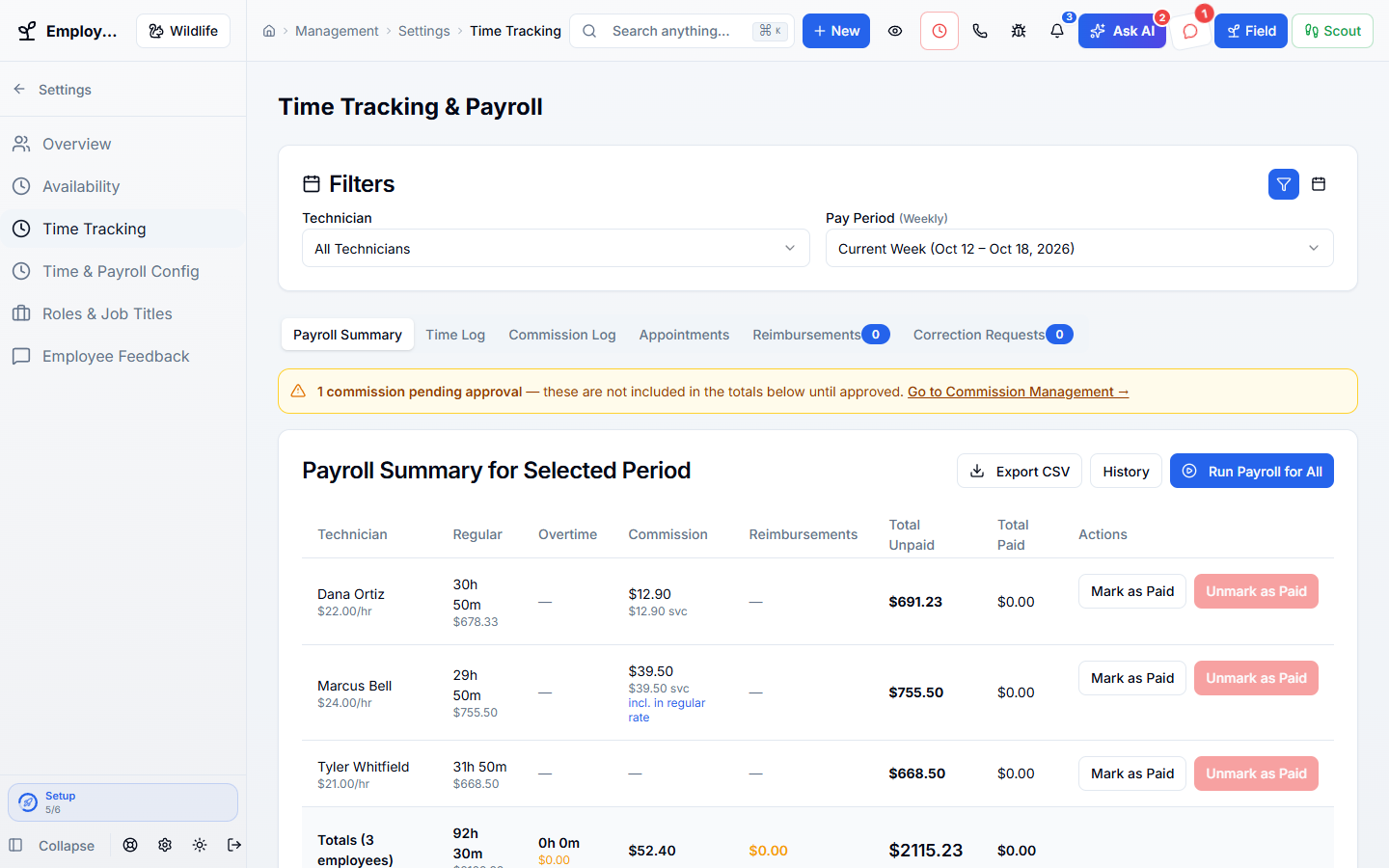
Collect work hours, breaks, and approved commissions for payroll. Give staff access to their pay stubs and work documents.
Works hand in hand with the rest of WildPipe
Built for your everyday work
Record hours and breaks
Sound familiar?
Clock records, overtime, commissions, reimbursements, and pay stubs should not meet for the first time on payroll morning.
What Time & Payroll does for you
Track clock-ins, breaks, overtime, commissions, reimbursements, payroll runs, pay stubs, and tax documents from the same work record your crew uses every day.
Clock activity can be reviewed beside schedules, routes, and completed jobs.
Only approved, payable amounts move into payroll, including late approvals from earlier periods.
Pay stubs, tax forms, reimbursements, and time information are available without an office request.
Periods, adjustments, reports, and payment state remain reviewable after the run closes.
Why owners switch
The things owners complain about most in other software, and how WildPipe handles them instead.
With other software
Time clocks, commissions, and payroll live in three tools.
With WildPipe
Time, commissions, and payroll are reviewed together.
With other software
Late-approved commissions fall through the cracks between pay periods.
With WildPipe
Anything approved late carries into the next payroll automatically.
With other software
Paid entries get changed after the fact.
With WildPipe
Paid commission records are locked, and every change is recorded.
Based on frustrations owners commonly share in public reviews of field-service and pest control software. See side-by-side comparisons.
Everything included
Explore what time & payroll includes, how the parts work together, and where you stay in control.
See it work
These are real WildPipe screens. Click the highlighted spot to do what your team does to track time and prepare payroll cleanly.
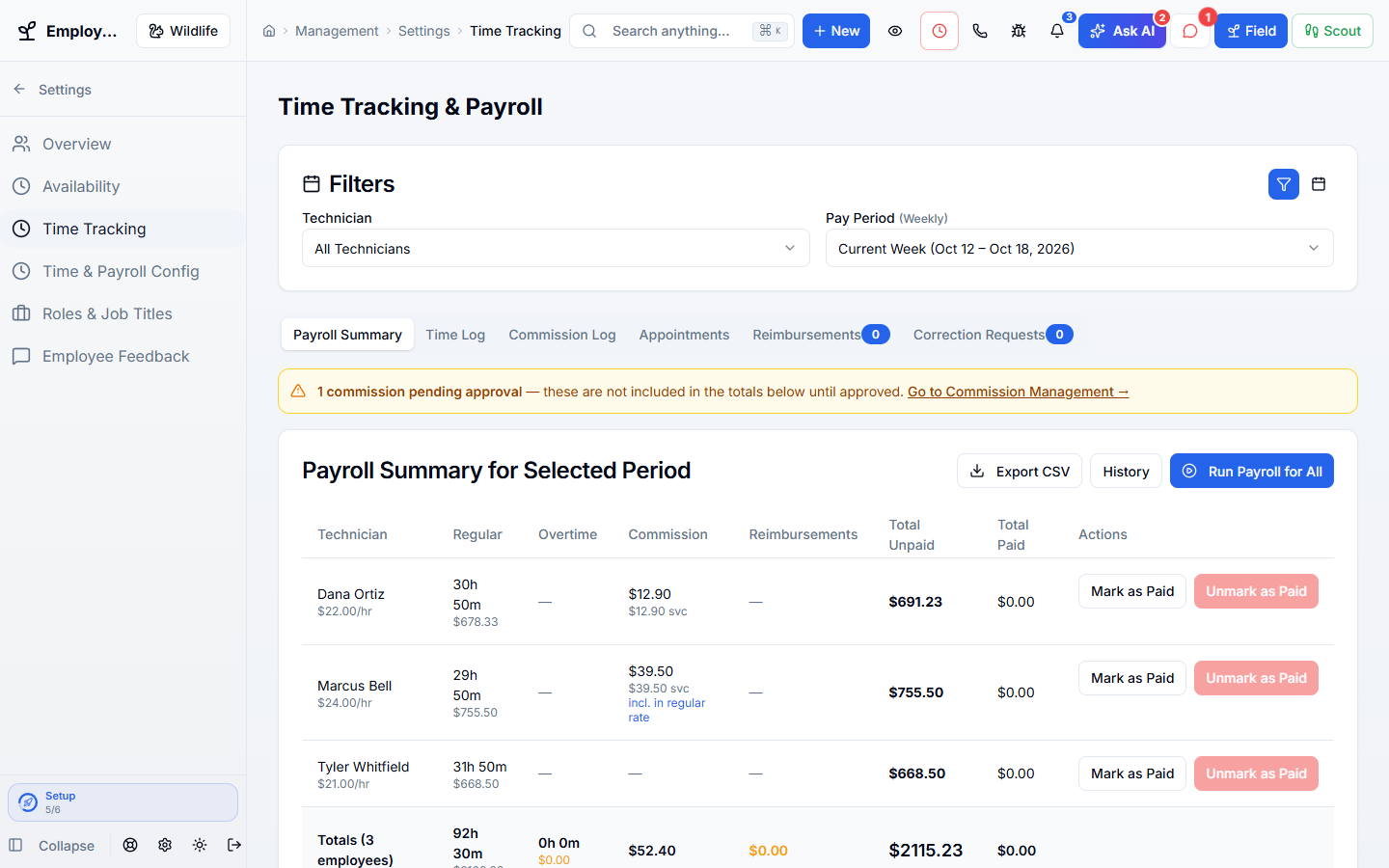
Click the highlighted spot, or use Next.Step 1 of 3
Make it fit your business
The controls worth knowing before you put time & payroll to work.
How the work flows
Collect time entries and review the pay period.
Check hours, eligible commissions, and other payroll items.
Complete the payroll workflow and make the resulting records available to staff.
In your working day
Examples of how a typical job can go. Your results depend on your business.
Example 01
At the end of a pay period, review recorded hours and approved commissions instead of gathering separate spreadsheets.
Example 02
A commission is approved after its original period. Include it in the next eligible payroll run.
Example 03
A field technician opens a pay stub from employee self-service without needing office access.
Real work, start to finish
Examples of how a typical job can go. Your results depend on your business.
Scenario 01
A tech clocks in from the field, takes a recorded break, works overtime, and completes two commissionable jobs. The payroll review shows the entire day together.
Scenario 02
A commission is approved after the prior payroll closed. It carries into the next run instead of disappearing between date filters.
Scenario 03
An employee submits a fuel reimbursement with a private receipt and later downloads the pay stub and tax form from employee services.
Connected, not complicated
Clear answers. No sales jargon.
Choosing software is a business decision. Let’s make sure it fits the way you work.
Talk through your questionsNo. Auto-generated commissions require approval before they become payable. Holds can also delay eligibility.
No. Review the supported payroll workflow and any external processing requirements during setup rather than assuming those services are included.
Your business. Your next chapter.
Bring your questions. We’ll show you how WildPipe fits the way your business works.